Attaching clips: Analysis of force pattern and applying the TLV®
T. Armstrong- In this exercise, you will estimate the standard time for attaching paper clips to bundles of cards.
- Determine a standard method based on observations or using a predetermined time system, e.g., MTM or MODAPTS.
- Estimate the finger forces for each step, starting with observations and then using physical measurements.
- Calculate the average hand work force (Force > fatigue threshold) and the duty cycle for each hand.
- Use the ACGIH TLV® to determine if this job exceeds recommended limits.
- Finally, you will explore alternative ways to reduce the force requirements.
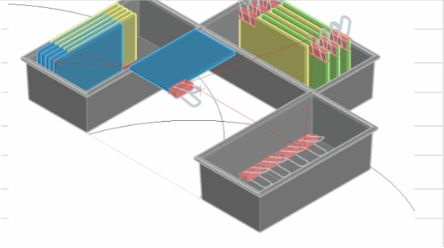
Attach clips job information:
- Standing or sitting workstation (Specify range based on elbow height minus 0.1m).
|
|
Steps for completing exercise
- Familiarize yourself with the job & collect the necessary information for your analysis.
- Estimate absolute and relative force requirements
- Use time study or a predetermined time system to determine time and force for each job step.
- Most steps can be characterized as reach, grasp, move, position, apply force, hold, or idle.
- Job steps may be grouped based on common attributes such as force, e.g., a simple packing job might characterized using 2 steps, one which a constant hand force (more or less) is exerted to "grasp/move/position" the work object and one which a negligible force (more or less) is exerted to "reach for the object."
- Your analysis should be based on a "qualified and trained worker, normal conditions, and a normal work pace.
- Calculate total cycle time, work time, rest time, duty cycle, and time-weighted average work force.
- Use the ACGIH TLV® to determine if the observed %MVC and duty cycle are within recommended limits.
- Calculate additional recovery time if needed.
- Explore ways that you can reduce the force requirements as an alternative to providing more rest time.
Use Video Analysis App to determine work force pattern
- Download job video
- Video Methods Analysis App
- Open app
- Open the job video with app
- move the video forward and backward to locate the ending point time for each location. Record the job step for each hand as described above. Also, estimate the %MVC for each step.
- click on the "Append Table" button to record or data. The program will record your the time shown for the center video window along with your data entries.
- You can return to any row of data and the corresponding video location by clicking on the row of interest. You can then change your entries and overwrite the original entry or you can delete the row that you have selected.
- Data do not have to be entered chronologically. You can go to any location and enter and enter new data. It will be stored with the with the correwsponding video time.
- Clice on the "Sort Table on Time" button sort you data in ascending time order.
- Be sure to save your work by exporting the datatable to a .csv file
- You can upload the saved .csv file for additional analysis at a later time.
Determine force required to open clips
| Sample force values to open clips sufficiently to insert cards (forces in gms). |
|||||||
| 1 3900 | 2 4300 | 3 4100 | 4 3800 | 5 3600 | 6 3600 | 7 | 8 4200 |
- For the purpose of this exercise, assume an average clip force = 4,000 gm or 4Kg.
- Note: the force can vary greatly from one clip to another.
- How would this variability affect your management of fatigue and "standard time" recommendation?
Determine %MVC based on Palmar Pinch Strength
Palmar Pinch Strength (pounds) based on a survey of 310 male and 328 females, ages 20-94, from suburban and rural seven-county Milwaukee area, and broad range of socioeconomic and occupational backgrounds.
Adapted from: Mathiowetz V, et al. 1985. Grip and pinch strength: normative data for adults. Arch Phys Med Rehabil, 66(2), 69-74.
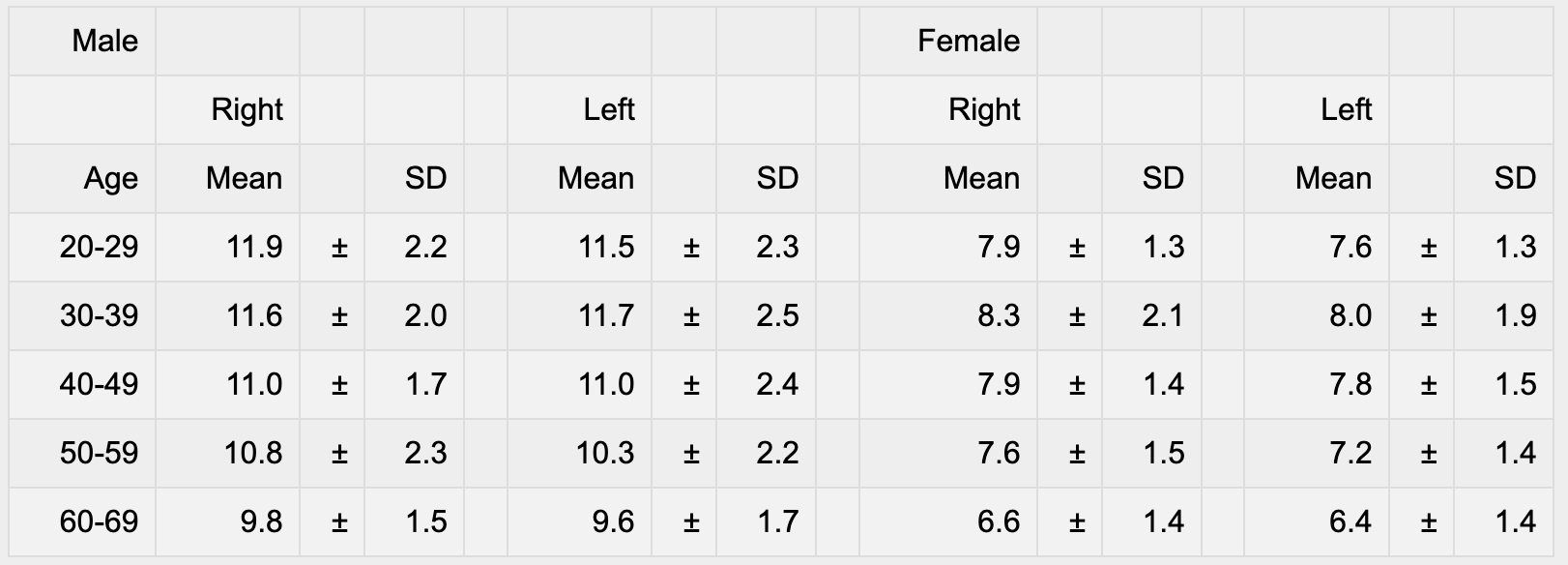
Assume:Male strength: 12Kg; Female strength: 8Kg
| Female | Male | |||
|---|---|---|---|---|
| Req Force | Strength | %MVC | Strength | %MVC | 4 | 8 | 50% | 12 | 33% |
Apply TLV®
see: Localized Fatigue: Section 7: Fatigue Limits - Repetitive Exertions
- Compute (from analysis of load pattern):
- Tcycle:
- Twork (when %MVC ≥ fatigue threshold):
- Trecovery (when %MVC < fatigue threshold):
- Duty Cycle (Twork / Tcycle):
- %MVCwork (%MVC ≥ fatigue threshold):
- Apply TLV®
- Calculate recommended %MVCwork for observed Duty Cycle:
- Calculate recommend Duty cycle for observed %MVCwork:
- Design intervention
- Increase recovery time for recommended Duty Cycle
Text boxes are for temporary notes only. your entries presently cannot be saved.